<?xml version="1.0" encoding="utf-8"?>
<feed xmlns="http://www.w3.org/2005/Atom">

  <title><![CDATA[Plamen Dimitrov's homepage and blog]]></title>
  <link href="http://plamendimitrov.net/atom.xml" rel="self"/>
  <link href="http://plamendimitrov.net/"/>
  <updated>2015-11-11T03:49:50+01:00</updated>
  <id>http://plamendimitrov.net/</id>
  <author>
    <name><![CDATA[Plamen Dimitrov]]></name>
    
  </author>
  <generator uri="http://octopress.org/">Octopress</generator>

  
  <entry>
    <title type="html"><![CDATA[R package for working with RRD files]]></title>
    <link href="http://plamendimitrov.net/blog/2014/08/09/r-package-for-working-with-rrd-files/"/>
    <updated>2014-08-09T17:50:28+02:00</updated>
    <id>http://plamendimitrov.net/blog/2014/08/09/r-package-for-working-with-rrd-files</id>
    <content type="html"><![CDATA[<p>This summer I had the immense pleasure to participate in the 10th edition of <a href="https://www.google-melange.com/gsoc/homepage/google/gsoc2014">Google Summer of Code</a> as one of the students working for <a href="http://ganglia.sourceforge.net/">Ganglia</a>.
I was mentored by <a href="http://danielpocock.com/">Daniel Pocock</a> and my project dealt mostly with getting <a href="http://en.wikipedia.org/wiki/RRDtool">RRD</a> data into <a href="http://www.r-project.org/">R</a> to allow for efficient data analysis.</p>

<p>Tools such as <a href="http://oss.oetiker.ch/rrdtool/">RRDtool</a> and <a href="https://code.google.com/p/rrd2csv/">rrd2csv</a> can export an RRD file to xml or csv.
While these formats can be imported into R, a more efficient and scalable approach would be to import the binary data directly (without exporting to an intermediate format first).
To achieve this I implemented an <a href="https://github.com/pldimitrov/Rrd">R package</a> that uses <a href="http://oss.oetiker.ch/rrdtool/doc/librrd.en.html">librrd</a> to read  binary data from an RRD file directly into data structures in R.</p>

<p>The <a href="http://www.biostat.jhsph.edu/~bcaffo/statcomp/files/dotCall.pdf">.Call</a> interface allows for calling C functions from R.
Using .Call and the R headers for C makes it possible to pass R (<em>SEXP</em>) objects to C functions, generate, manipulate and return such back to R.
A <em>SEXP</em> object can be of any data type used in R - e.g. vector, <em>data.frame</em>, integer, etc.
This lets us implement C functions that take <em>SEXP</em> objects as arguments, use core librrd functions (<em>rrd_fetch_r</em>, <em>rrd_info</em>, <em>rrd_first</em>, <em>rrd_last</em>, etc.) to retrieve data from RRD files, generate  <em>SEXP</em> objects (such as <em>data.frame</em>-s), populate them with the retrieved data and return them to the caller function in R.</p>

<p><a href="http://mazamascience.com/WorkingWithData/?p=1099">Here</a> is a great introduction to .Call written by Jonathan Callahan.</p>

<h2>The package provides the following functions:</h2>

<ul>
<li><strong><em>importRRD(filename, consolidation function, start, end, step)</em></strong></li>
</ul>


<p>Acts as a wrapper around <a href="https://github.com/oetiker/rrdtool-1.x/blob/master/src/rrd_fetch.c"><em>rrd_fetch_r</em></a>.
The user needs to have knowledge about the contents of the file beforehand to pick the right parameters.
Returns a <em>data.frame</em> object containing the desired portion of the RRA that <strong>best</strong> matches the parameters.
The data source names are retrieved and the columns of the <em>data.frame</em> are named accordingly.
Due to the implementation specifics of <em>rrd_fetch_r</em> the result does not include the row with timestamp <em>start</em>.</p>

<p>For more information on <em>rrd_fetch_r</em>, please consult the <a href="http://oss.oetiker.ch/rrdtool/doc/rrdfetch.en.html">official RRDtool documentation</a></p>

<ul>
<li><strong><em>importRRD(filename)</em></strong></li>
</ul>


<p>Reads the metadata provided by <em>rrd_info</em> and uses it to import all RRA-s in their entirety.
Retrieves an <em>rrd_info_t</em> struct which contains the parameters for each RRA and uses these, together with the boundary values provided by <em>rrd_first</em> and <em>rrd_last</em> to fetch each RRA using <em>rrd_fetch_r</em>.
The user does not need to have any knowledge about the contents of the RRD file beforehand.
Returns a list of <em>data.frame</em> objects, each labeled accordingly (&ldquo;AVERAGE15&rdquo; corresponds to an RRA with <em>consolidation function</em> &ldquo;AVERAGE&rdquo; and <em>step</em> 15).</p>

<ul>
<li><strong><em>getVal(filename, consolidation function, step, timestamp)</em></strong></li>
</ul>


<p>When the user is interested in looking at individual values in an RRA it might not be convenient to retrieve the entire contents of an RRD if the file is too large.
Retrieving portions of a specific RRA might result in a lot of reads from the RRD file (if few values are requested at a time) and indexing by row name in a <em>data.frame</em> (if more values are requested) is known to be inefficient in R.</p>

<p><em>getVal</em> is optimized for working with indivudial values and uses a package-wide read-ahead cache to minimize the frequency of file reads.
The cache is implemented as an <em>environment</em> object.
Environments in R can be used as hash tables as is demonstrated <a href="http://broadcast.oreilly.com/2010/03/lookup-performance-in-r.html">here</a>.
A key is generated from  <em>filename</em>, <em>consolidation function</em> and <em>step</em>.
A <em>data.frame</em> is associated with each key and represents a per-RRA cache.
The read-ahead size and the total size of the cache (per RRA) can be adjusted via setting the <em>rrd.cacheBlock</em> and <em>rrd.cacheSize</em> constants to the appropriate values.</p>

<p>Since looking up rows by row names (if we are to use <em>dataFrame[&ldquo;timestamp&rdquo;, ]</em>) is not done in constant time in R, the row index is calculated from the boundary timestamp values in the current cache and the <em>timestamp</em> and <em>step</em> parameters to allow for immediate indexing, instead.
In order for this to work we have to make sure the cache contains no gaps - i.e. the time distance between any two adjacent values in the cache is <em>step</em>.
<em>getVal</em> also checks if the <em>timestamp</em> is valid by looking at the boundaries of the cache and <em>step</em>. It will not cause an unnecessary call to <em>rrd_fetch_r</em> if it isn&rsquo;t.</p>

<p>The cache is updated as the following:</p>

<p>&ndash; if <em>rrd.cache[[key]]</em> is NULL (i.e. there are no entires in the cache for that RRA) - retrieve a timestamp range that includes the <em>rrd.cacheBlock</em> next and previous values and store that in the cache.</p>

<p>&ndash; if the requested <em>timestamp</em> is larger than the latest currently stored timestamp in the cache, extend the cache to also include the values up until <em>rrd.cacheBlock</em> values after the requested one.</p>

<p>&ndash; similarly, extend the cache to include all values starting <em>rrd.cacheBlock</em> ones before the requested <em>timestamp</em> if it is smaller than the earliest currently stored.</p>

<p>&ndash; if the newly obtained cache entry for a given RRA is to exceed <em>rra.cacheSize</em> in size, that entry is replaced with the  <em>rrd.cacheBlock</em> next and previous values around the requested <em>timestamp</em> as in the first case.</p>

<p>Another complication is due to the fact that, as mentioned above, <em>rrd_fetch_r</em> will try to always find the RRA that matches the parameters best.
In case a value with a <em>timestamp</em> smaller than the earliest available for the RRA of interest is requested, <em>rra_fetch_r</em> will sometimes try to deliver a portion from another RRA in this RRD that contains a value with the specified <em>timestamp</em>.
While this might be useful in certain situations, we really want to avoid this when working with the cache as each RRA we are getting values from is associated with a specific <em>data.frame</em> in the cache and we want all values to be <em>step</em> apart (the RRA that contains the <em>timestamp</em> could have a different <em>step</em>).</p>

<p>In order to solve this problem, <em>getVal</em> would obtain the earliest timestamp on the first cache-miss for a given RRA (and store it in a <em>rrd.first</em> environment object). It will then not allow <em>rrd_fetch_r</em> to be called with a <em>timestamp</em> smaller than the first one for a given RRA.</p>

<h2>Example use</h2>

<ul>
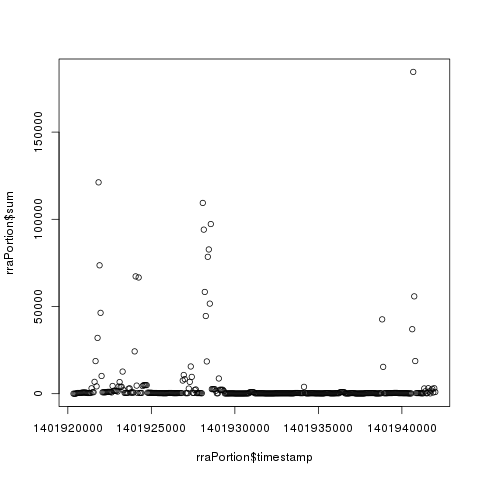
<li>Retrieving a portion from a certain RRA in a RRD file and plotting the data.</li>
</ul>


<figure class='code'><div class="highlight"><table><tr><td class="gutter"><pre class="line-numbers"><span class='line-number'>1</span>
<span class='line-number'>2</span>
<span class='line-number'>3</span>
<span class='line-number'>4</span>
<span class='line-number'>5</span>
<span class='line-number'>6</span>
<span class='line-number'>7</span>
<span class='line-number'>8</span>
<span class='line-number'>9</span>
<span class='line-number'>10</span>
<span class='line-number'>11</span>
<span class='line-number'>12</span>
</pre></td><td class='code'><pre><code class=''><span class='line'>> rraPortion = importRRD("/tmp/bytes_in.rrd", "AVERAGE", 1401920280, 1401942000, 60)
</span><span class='line'>
</span><span class='line'>> head(rraPortion)
</span><span class='line'>            timestamp      sum num
</span><span class='line'>1401920340 1401920340  24.0400   1
</span><span class='line'>1401920400 1401920400  24.0400   1
</span><span class='line'>1401920460 1401920460  24.0400   1
</span><span class='line'>1401920520 1401920520 248.5335   1
</span><span class='line'>1401920580 1401920580 432.2100   1
</span><span class='line'>1401920640 1401920640 432.2100   1
</span><span class='line'>
</span><span class='line'>> plot(rraPortion$timestamp, rraPortion$sum)</span></code></pre></td></tr></table></div></figure>


<p><img class="center" src="http://plamendimitrov.net/images/rplot.png" title="plotting the RRA data in R" ></p>

<ul>
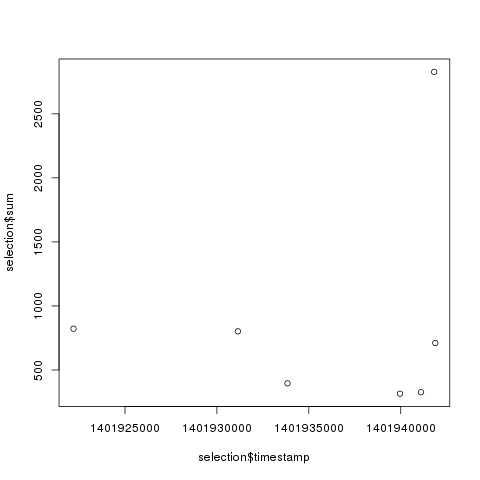
<li>Retrieving a selection of values at specific timestamps from a certain RRA.</li>
</ul>


<figure class='code'><div class="highlight"><table><tr><td class="gutter"><pre class="line-numbers"><span class='line-number'>1</span>
<span class='line-number'>2</span>
<span class='line-number'>3</span>
<span class='line-number'>4</span>
<span class='line-number'>5</span>
<span class='line-number'>6</span>
<span class='line-number'>7</span>
<span class='line-number'>8</span>
<span class='line-number'>9</span>
<span class='line-number'>10</span>
<span class='line-number'>11</span>
<span class='line-number'>12</span>
<span class='line-number'>13</span>
</pre></td><td class='code'><pre><code class=''><span class='line'>> indices = c(1401941100, 1401941880, 1401939960, 1401933840, 1401931140, 1401941820, 1401922200)
</span><span class='line'>> selection = do.call("rbind", lapply(indices, getVal, filename = "/tmp/bytes_in.rrd", cf="AVERAGE", step=60))
</span><span class='line'>> selection
</span><span class='line'>            timestamp       sum num
</span><span class='line'>1401941100 1401941100  326.3180   1
</span><span class='line'>1401941880 1401941880  710.8600   1
</span><span class='line'>1401939960 1401939960  315.0500   1
</span><span class='line'>1401933840 1401933840  395.6060   1
</span><span class='line'>1401931140 1401931140  801.9072   1
</span><span class='line'>1401941820 1401941820 2827.4305   1
</span><span class='line'>1401922200 1401922200  822.5800   1
</span><span class='line'>
</span><span class='line'>> plot(selection$timestamp, selection$sum)</span></code></pre></td></tr></table></div></figure>


<p><img class="center" src="http://plamendimitrov.net/images/rselectionplot.png" title="plotting the RRA selection in R" ></p>

<p>The same result can be achieved with:</p>

<figure class='code'><div class="highlight"><table><tr><td class="gutter"><pre class="line-numbers"><span class='line-number'>1</span>
<span class='line-number'>2</span>
<span class='line-number'>3</span>
</pre></td><td class='code'><pre><code class=''><span class='line'>> rrd = importRRD("/tmp/bytes_in.rrd")
</span><span class='line'>> selection = rrd$AVERAGE60[as.character(indices), ]
</span><span class='line'>> plot(selection$timestamp, selection$sum)</span></code></pre></td></tr></table></div></figure>


<p>by importing the entire RRD file first.</p>

<ul>
<li>One can take advantage of the many possibilities to manipulate <em>data.frame</em> objects in R - e.g. performing various types of joins.</li>
</ul>


<figure class='code'><div class="highlight"><table><tr><td class="gutter"><pre class="line-numbers"><span class='line-number'>1</span>
<span class='line-number'>2</span>
<span class='line-number'>3</span>
<span class='line-number'>4</span>
<span class='line-number'>5</span>
<span class='line-number'>6</span>
<span class='line-number'>7</span>
<span class='line-number'>8</span>
<span class='line-number'>9</span>
<span class='line-number'>10</span>
</pre></td><td class='code'><pre><code class=''><span class='line'>> innerJoin = merge(rra1, rra2, by = "timestamp")
</span><span class='line'>> head(innerJoin)
</span><span class='line'>
</span><span class='line'>   timestamp       sum.x num.x       sum.y     num.y
</span><span class='line'>1 1401921000    675.5600     1    458.6034 1.0000000
</span><span class='line'>2 1401921600   6811.4233     1   1438.8657 1.0000000
</span><span class='line'>3 1401922200    822.5800     1  30883.0741 1.0000000
</span><span class='line'>4 1401922800   1677.4500     1   1462.9487 1.0000000
</span><span class='line'>5 1401923400    433.0000     1   3849.4176 1.0000000
</span><span class='line'>6 1401924000  24278.2883     1   3425.4432 1.0000000</span></code></pre></td></tr></table></div></figure>


<p>This makes it possible to easily prepare metrics data from multiple data sources and RRD files to be used for statistical analysis or fed to a neural network.</p>

<p>The <em>join_all</em> function from the <a href="http://cran.r-project.org/web/packages/plyr/index.html">plyr</a> package can be used to join an arbitrary number of <em>data.frame</em> objects</p>
]]></content>
  </entry>
  
</feed>